Summarising a tenancy's history
"Summarise history" shows the figures and a timeline of a tenancy on the lease and the contact: payments, open balance, dunning cases, reported issues, correspondence and terminations. On request the AI words the same facts as text.
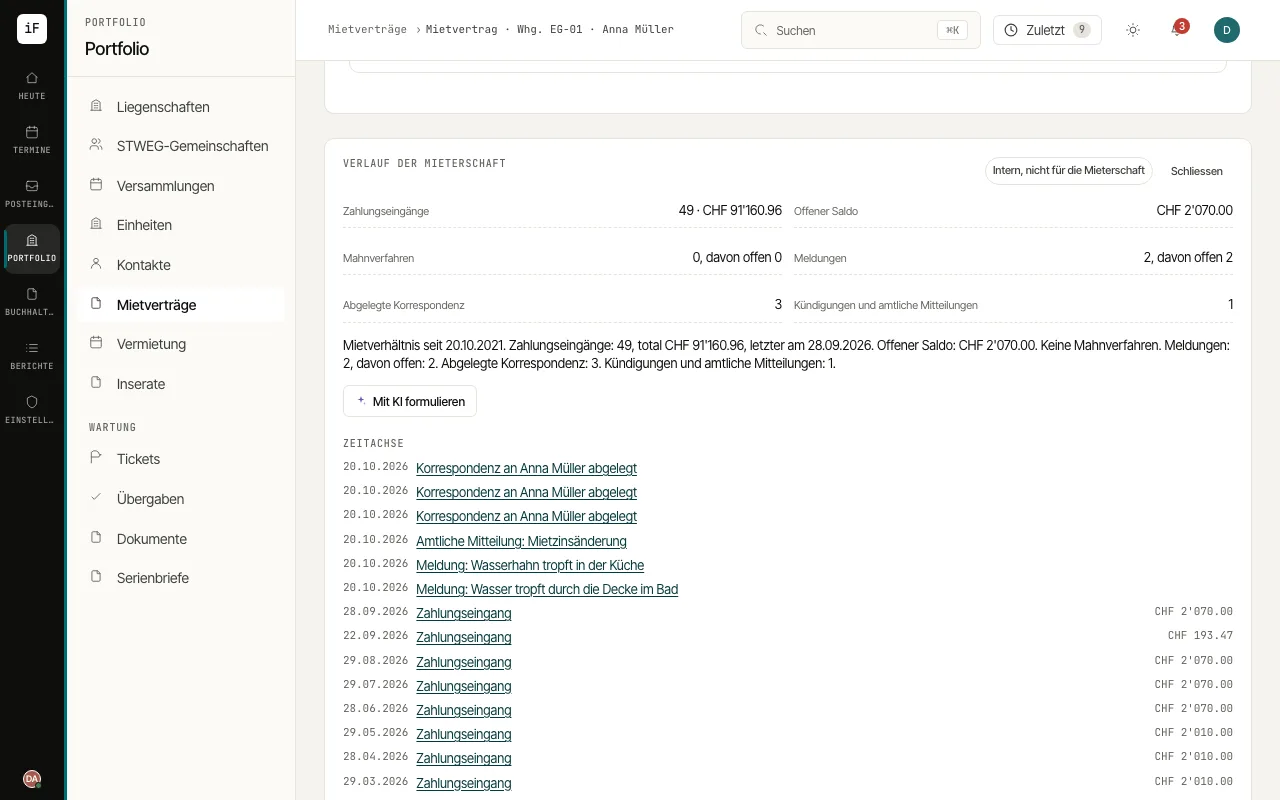
Open a tenant's contact on the "Overview" tab, or the lease, and choose "Summarise history".
Read the figures "Payments received", "Open balance", "Dunning cases", "Reported issues", "Correspondence kept" and "Terminations and official notices", and the paragraph below them that ImmoFlow writes from the data.
In the "Timeline", open individual events such as a dunning case or a ticket to check them at the source.
If needed, choose "Word with AI". The text is marked "AI text from the same figures (please check)"; compare it with the figures before you use it.