Use the audit log, the archive and offboarding
The audit log records who created, changed, exported or viewed what and when, including document downloads and access to personal data. In the archive you find archived contacts, properties and units and restore them. Under «Archive & offboarding» you download the accounting at any time as a readable archive and, if your property management company leaves ImmoFlow, run the offboarding through to deletion.
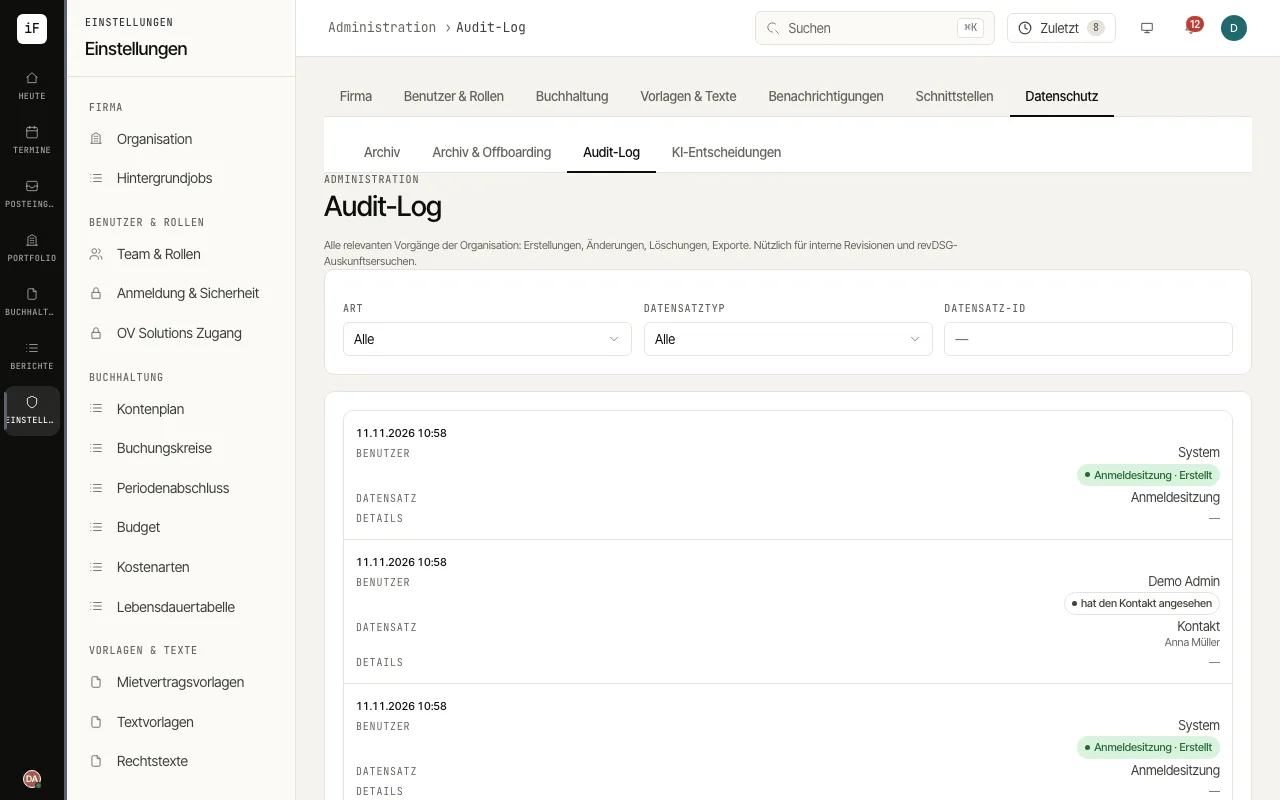
Open «Audit log». The list shows time, user, action, record and details, newest entries first.
Narrow it down with «Kind»: «Changes» for creations, changes and deletions, or «Access to personal data and files» for viewed contacts and applications and downloaded documents and exports.
With «Record type» and «Record ID» you follow the history of a single record, for example for an internal audit or a data protection request.
Under «Archive» you see archived contacts, properties and units. «Restore» makes an entry active again, as it was before archiving; a unit comes back as vacant.
For an archive, open «Archive & offboarding», choose under «Export archive» the «Books» or «All books», «From fiscal year» and «To fiscal year», and click «Create archive». The ZIP file is created in the background and holds the year-end closings, every receipt, the bank files as received, the records and their checksums.
If your property management company leaves ImmoFlow, click «Request offboarding». From then on it is read-only for every user (band «READ-ONLY»): reading and downloading remain, scheduled runs such as dunning and invoicing pause. The full archive is created and sealed; download it with «Download archive» and confirm with «Confirm download» and the checksum of your file (SHA-256).
After the confirmed download a grace period starts; its date is shown on the page. Only then does the ImmoFlow team delete your data, and only on your explicit instruction. Until then «Withdraw offboarding» lets you work normally again. The sealed archive is kept for the statutory retention period.