Turnover rent: reports, reminder and annual settlement
Shops and restaurants often pay a base rent plus a share of their turnover. ImmoFlow keeps the tenant's turnover reports per period, reminds gently of missing reports and settles the year with an additional payment; the settlement is a PDF in the portal.
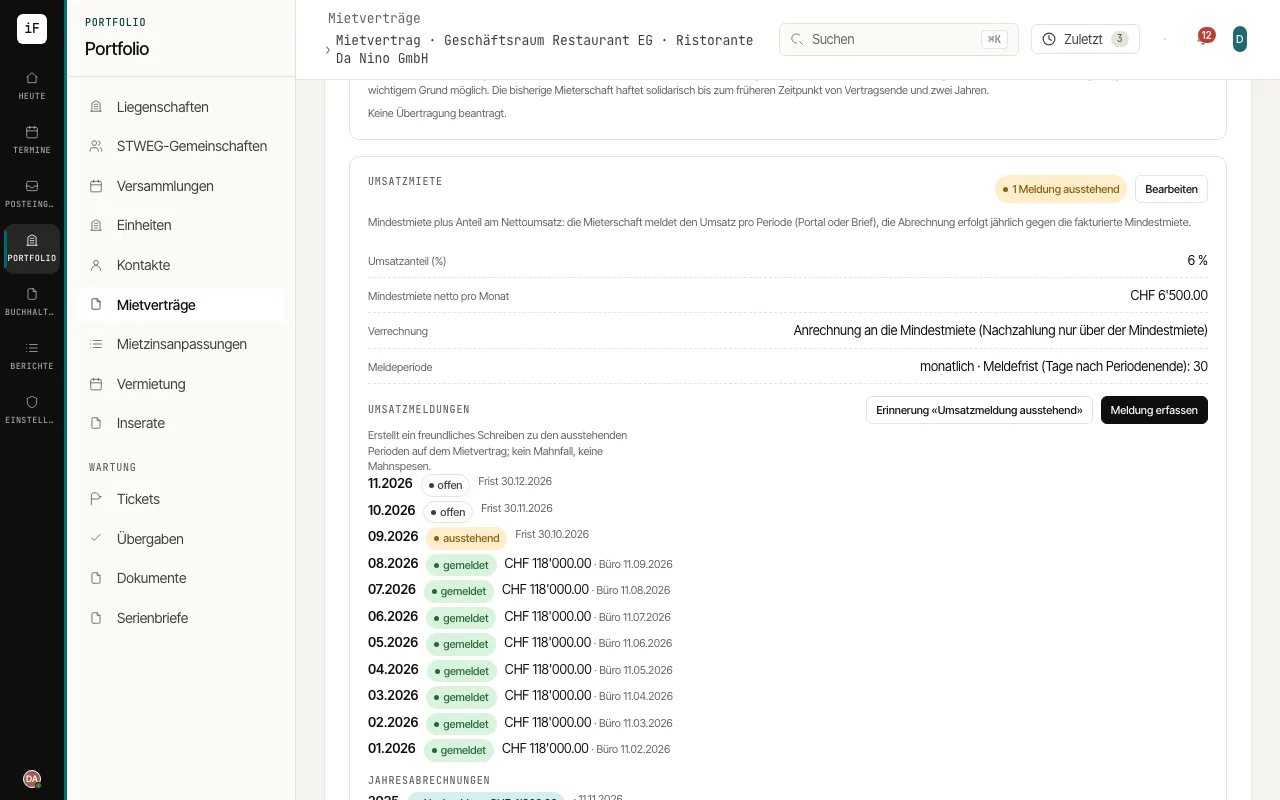
Switch on: in the new lease, tab "Commercial", enable "Turnover rent" (off by default) and enter the rate, the settlement mode, the reporting period (monthly or yearly) and the reporting deadline in days. On the lease everything is editable on the "Turnover rent" card; the contract prints the clauses on turnover rent, annual settlement and reporting with the audit right.
Settlement mode: "Counted against the base rent" settles the year's turnover share against the base rent billed; only the excess is billed, there is no refund. "On top of the base rent" bills the whole turnover share. The base rent is invoiced monthly as before.
Reports: the tenant reports the net turnover in the portal (with attachment, receipt and audit trail) or by letter and e-mail; then you enter it with "Record report". Every period shows its state: open (deadline running), reported, missing (deadline passed).
Remind: a missing report appears under "What now?" on the lease. "Reminder" creates the friendly letter "turnover report outstanding" on the lease, no dunning case and no dunning fee.
Settle: once every period of a year is reported, the card offers "Create annual settlement". ImmoFlow computes the share, compares it with the base rent billed, issues an additional payment as an invoice with QR bill (VAT per the lease's option) and files the settlement with every figure as a PDF the tenant sees in the portal.