Sending reminders automatically or after approval
If you wish, the daily dunning run creates the due ordinary reminders itself and e-mails them. You decide whether each reminder first needs your approval, which stages are included and how many go out per day.
Open Settings › Organization and, in the "Automatic reminders" section, choose under "Sending": "Off (reminders by hand)", "With approval (queue on the dunning page)" or "Automatically by e-mail".
Set the "Allowed stages" and "At most per day" and click "Save".
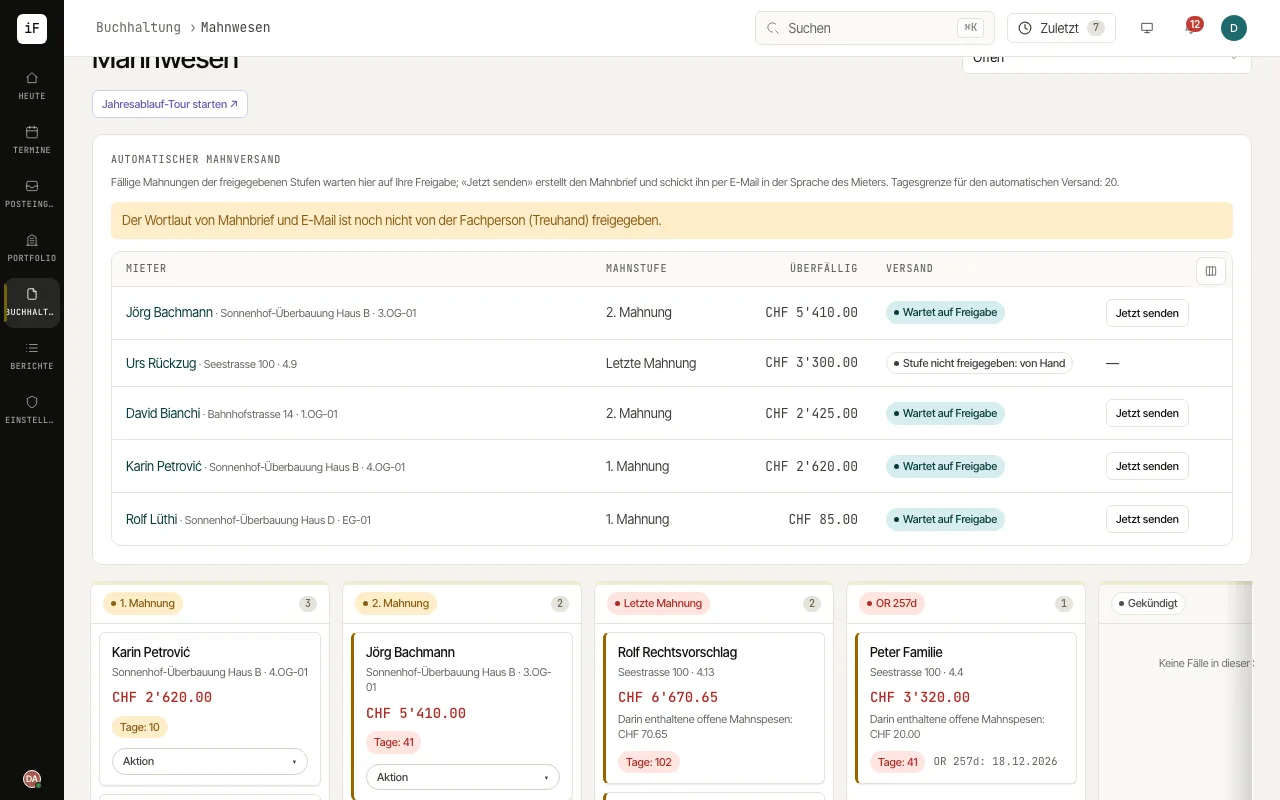
Under Accounting › Payment reminders, the "Automatic reminders" card shows the due reminders with "Tenant", "Stage", "Overdue" and "Dispatch".
In approval mode, check each row and click "Send now". ImmoFlow creates the reminder letter and e-mails it in the tenant's language. In automatic mode, the daily dunning run does this.
Handle rows marked "No e-mail: by post" or "Stage not allowed: by hand", and any failed e-mail, in the dunning case as usual.