Maintaining contacts, merging duplicates and keeping addresses current
Contacts are the people and companies behind tenancies, properties and orders. The duplicate check finds people recorded twice, and the address history makes sure a letter goes to the address that applies on its date.
Record a person with "New contact". For a Swiss address the street line suggests building addresses, the postcode fills in the town, and a town that does not belong to the postcode is pointed out. Foreign addresses are typed freely.
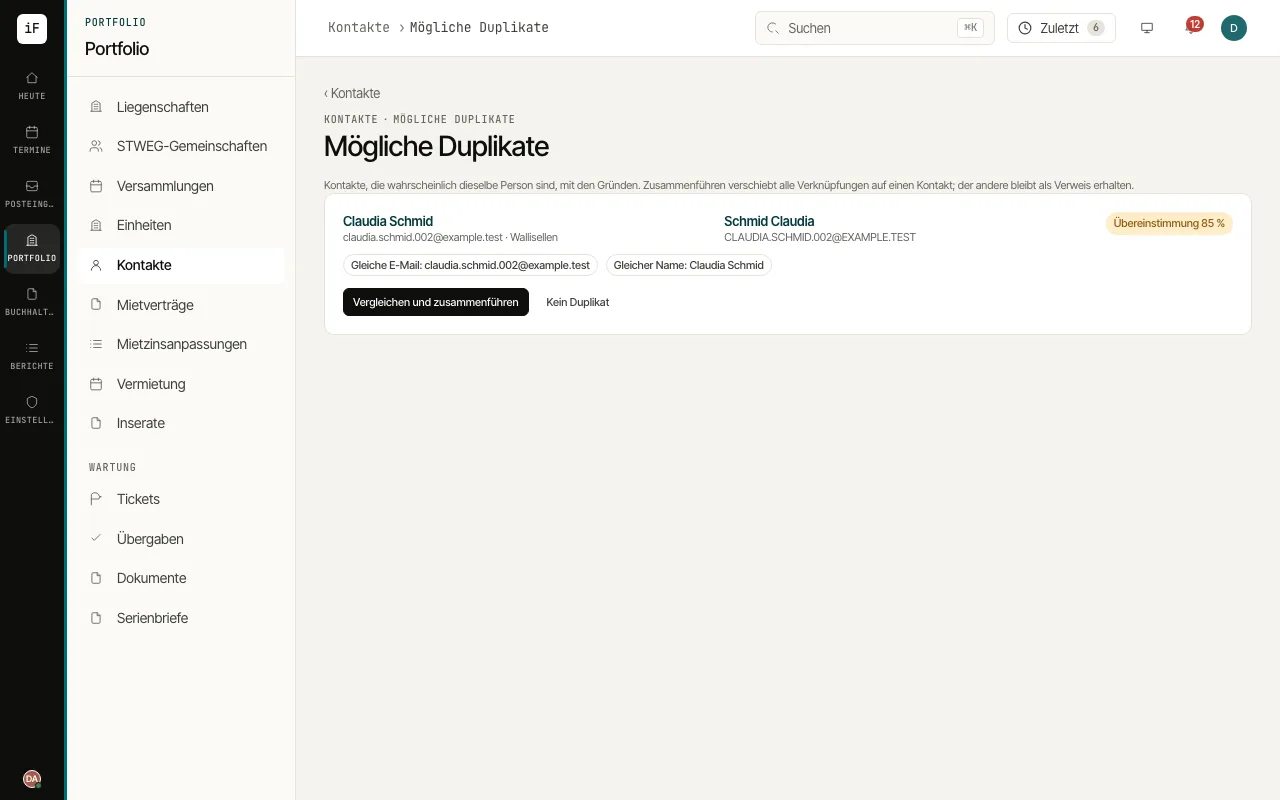
In the contact list, open "Check duplicates". Each pair shows the match as a percentage and the reasons, for example "Same e-mail" or "Similar name".
Click "Compare and merge" and choose the contact that stays under "Which contact stays?". The preview shows which links move, which details are taken over and which portal login remains. Only "Merge" combines the contacts. If it is not a double entry, choose "Not a duplicate".
When a person moves, choose "Move (new address from a date)" under "Address change" while editing the address and enter "Valid from". For a typing error choose "Correction of the current address". The "Address history" in the contact's overview lists every address with its date.