Service charges, handovers and profile in the tenant portal
Besides invoices and requests, the tenant portal offers your service charge statements with access to the receipts, the dates and reports of your apartment handovers, and your contact details and notifications.
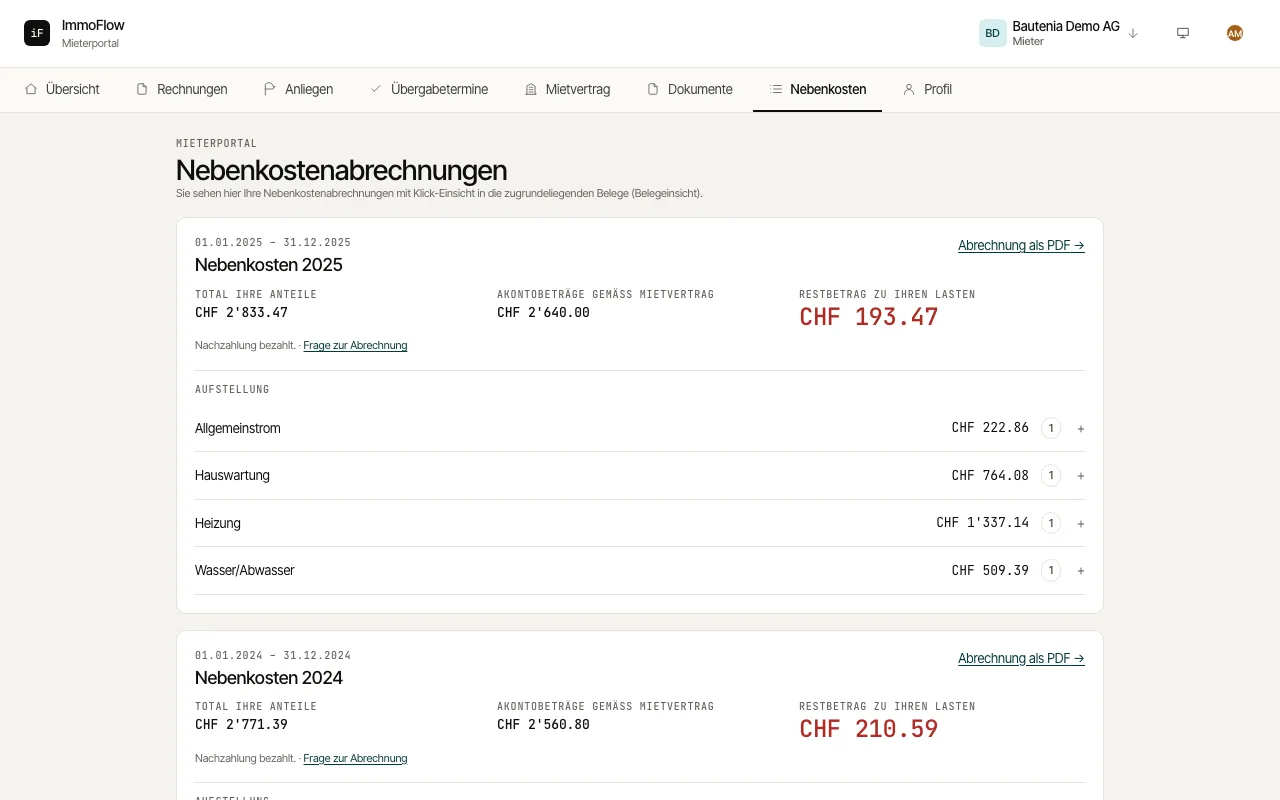
Open "Service charges". Each statement shows "Your total share", the "Advance amounts under the lease" and, as the result, a "Credit" or a "Balance payable by you".
Open a cost type in the "Breakdown" and view the underlying invoices under "Receipts". "Statement as PDF" downloads the statement.
Under "Handover appointments" you see scheduled move-in, move-out and periodic handovers. Once completed, open the report with "Open report"; if it is missing, ask for it with "Request protocol". At moving in, you can ask for your predecessor's return protocol from the move-in protocol (Art. 256a CO); once the property manager releases it, you download it there. Pre-existing defects are listed in a section of their own in the move-in protocol. Report defects you only discover after moving in to the property manager in writing and promptly, within 10 to 30 days depending on the lease.
Under "Profile" you update your phone and address, choose the "Language" and decide whether circulars from the management come by email or by post. How you hear about news on requests and requested documents is set per topic under "Notifications": in the portal, by email or as a push message on your device.