Handling VAT for commercial properties
If a VAT-registered owner lets commercial premises with the option to tax, ImmoFlow charges VAT on rent and service charges, posts output and input tax and produces the return per period from the journal. Flats remain excluded from the tax.
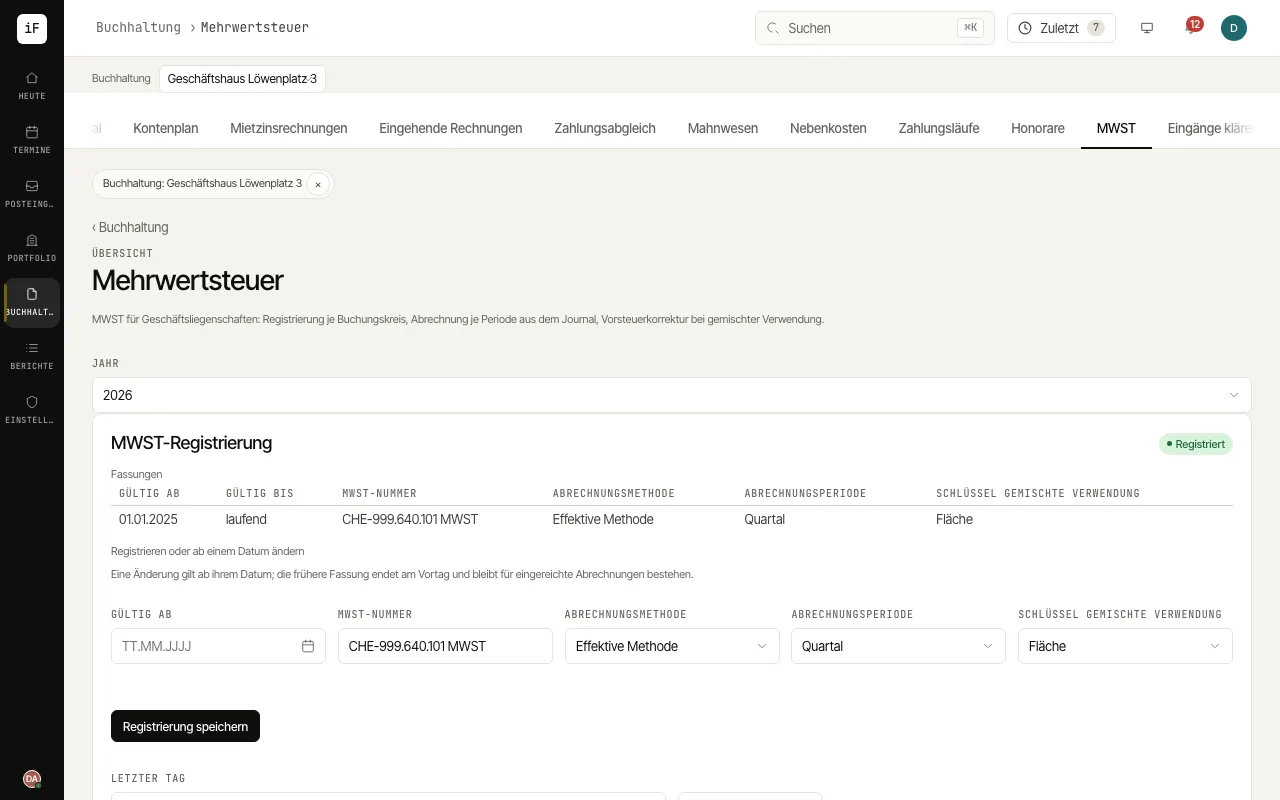
Choose the "Book" and "Year" at the top. If the accounting book is not registered, enter the "VAT number", "Valid from", "Method", "Return period" and "Mixed-use key" under "VAT registration" and click "Save registration". A change applies from its date.
Opt commercial premises one by one: open the unit, choose "Opt" in the "VAT" card, enter "Basis" and "From" and click "Record option". A parking space let on its own is "Taxable by law (parking space)".
For supplier invoices enter "Of which VAT (CHF)" and the "VAT code" as shown on the document. In a registered accounting book the deductible part is posted as input tax; rent invoices of opted leases show the VAT separately.
Under "Return periods" open a period with "Show". Check the figures, the "Agreement with the journal" and the "Postings of the period".
Once the period has ended, click "File the return". ImmoFlow freezes the figures and transfers output and input tax to the VAT settlement account (2201).
After the year end, check the key of the whole year under "Mixed use" and post the correction with "Post the input tax correction".