Drafting messages and letters from the data
On a lease, contact, property, handover, dunning case and ticket you draft messages and formal letters from the recorded facts. A text template of your office sets the wording, the AI phrases it on request; you check and decide what is saved.
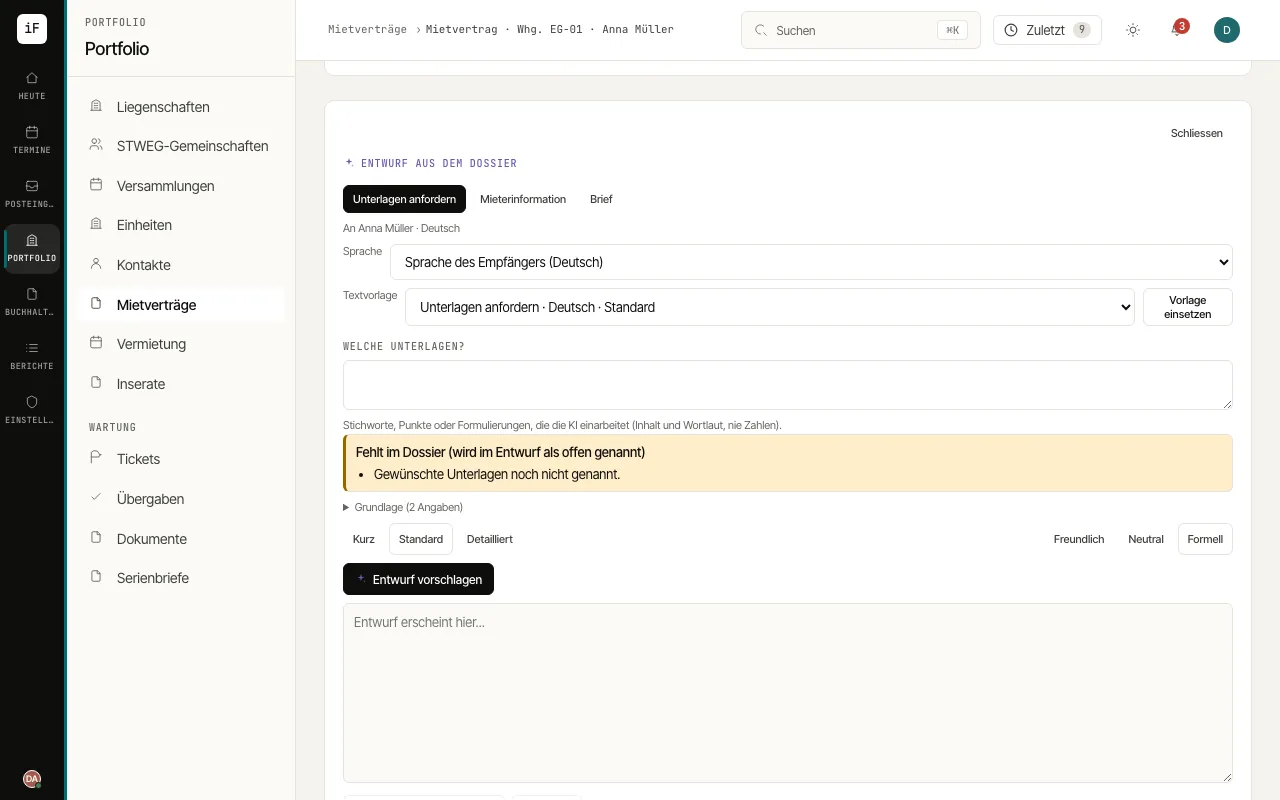
Open the record, for example a lease, and choose "Draft a message or letter" (on a ticket "Draft a letter"). Choose the kind of draft; depending on the record you can pick, for example, "Payment reminder", "Request documents", "Tenant information", "Appointment confirmation", "Follow-up after the handover" and "Letter".
Check the recipient and the "Language"; the recipient's language is preset. Under "Text template" the office's default template is preselected, and "Insert template" fills it from the data without the AI. For a request, an information or a letter, name the topic, and for a letter also the "Subject".
Read "Missing from the record" and the "Basis". Choose tone and length and click "Suggest draft". With a template the AI keeps its wording; whatever is missing in the record is marked in the text.
Edit the text. Keep a message with "Save on the record" or take it into your mail program with "Copy". Create a letter with "File as PDF letter": it gets the logo and address block and is filed on the record.