Capturing a letter or a voucher
You can upload a PDF, an image or a saved e-mail, or paste text for review; e-mails from a configured intake arrive by themselves. This produces a suggestion that you take further as a ticket, a follow-up letter, an invoice, a termination or a task.
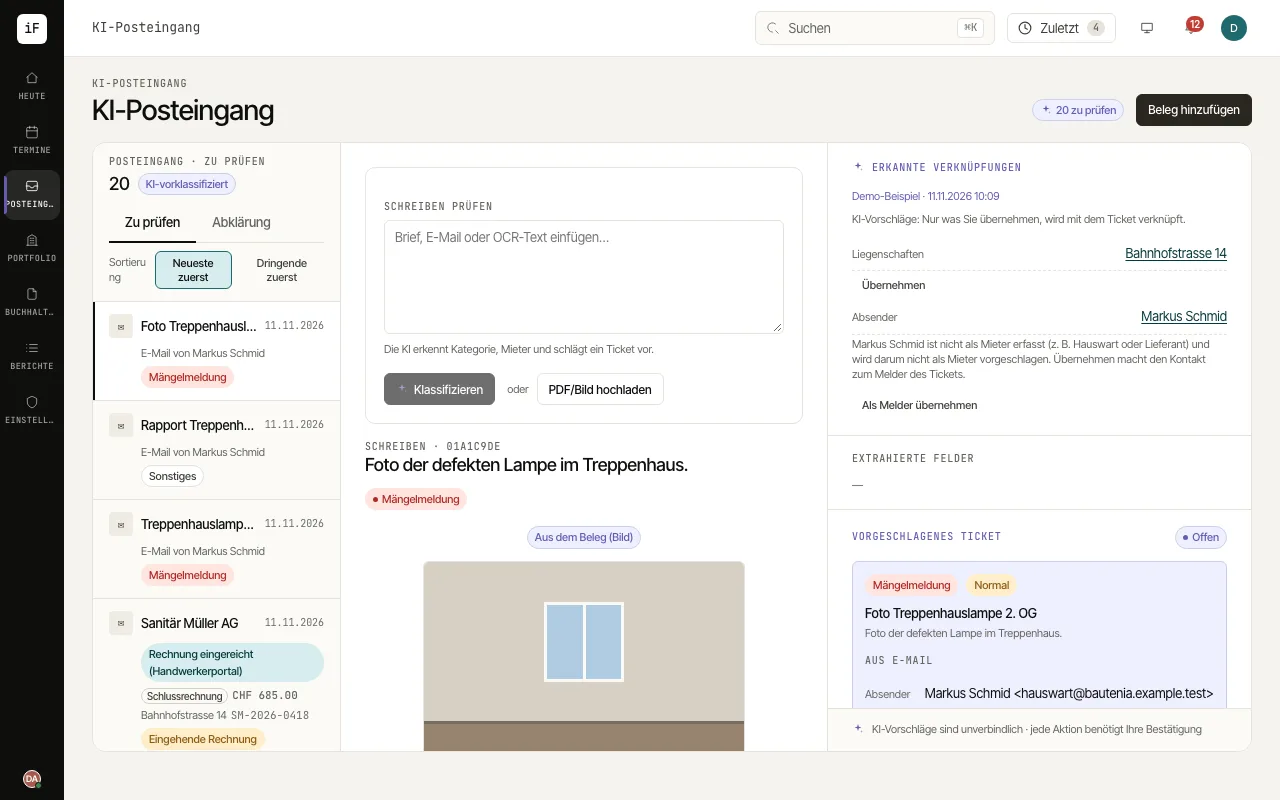
Open "Add voucher". For a document choose "Upload PDF/image", also for saved e-mails (.eml, Outlook .msg), or paste the text into "Review correspondence" and choose "Classify". Drag several files straight onto the inbox.
Uploaded files are read in the background: the item shows "Being read and classified" until the suggestion appears by itself. For an e-mail, the text becomes the letter and each attachment becomes an item of its own.
Check the detected type of case and the suggested links. Tenant, unit and property are only linked once you confirm them with "Take over".
Take the suggestion further along the intended route: as a new ticket, as a follow-up letter to an open ticket, as an invoice or, for a termination, under "Check the termination" with the date from the lease.
If the letter asks for something by a date, check the deadline read under "Create task/deadline" and create a task with "Create task". It appears in the task list and the calendar; the inbox item stays open.